Logic & Flow Control
Logic nodes control the flow of your workflow: branch based on conditions, loop over arrays, add delays, wait for human approval, and more. These are what turn a simple trigger-to-action into a powerful automation.
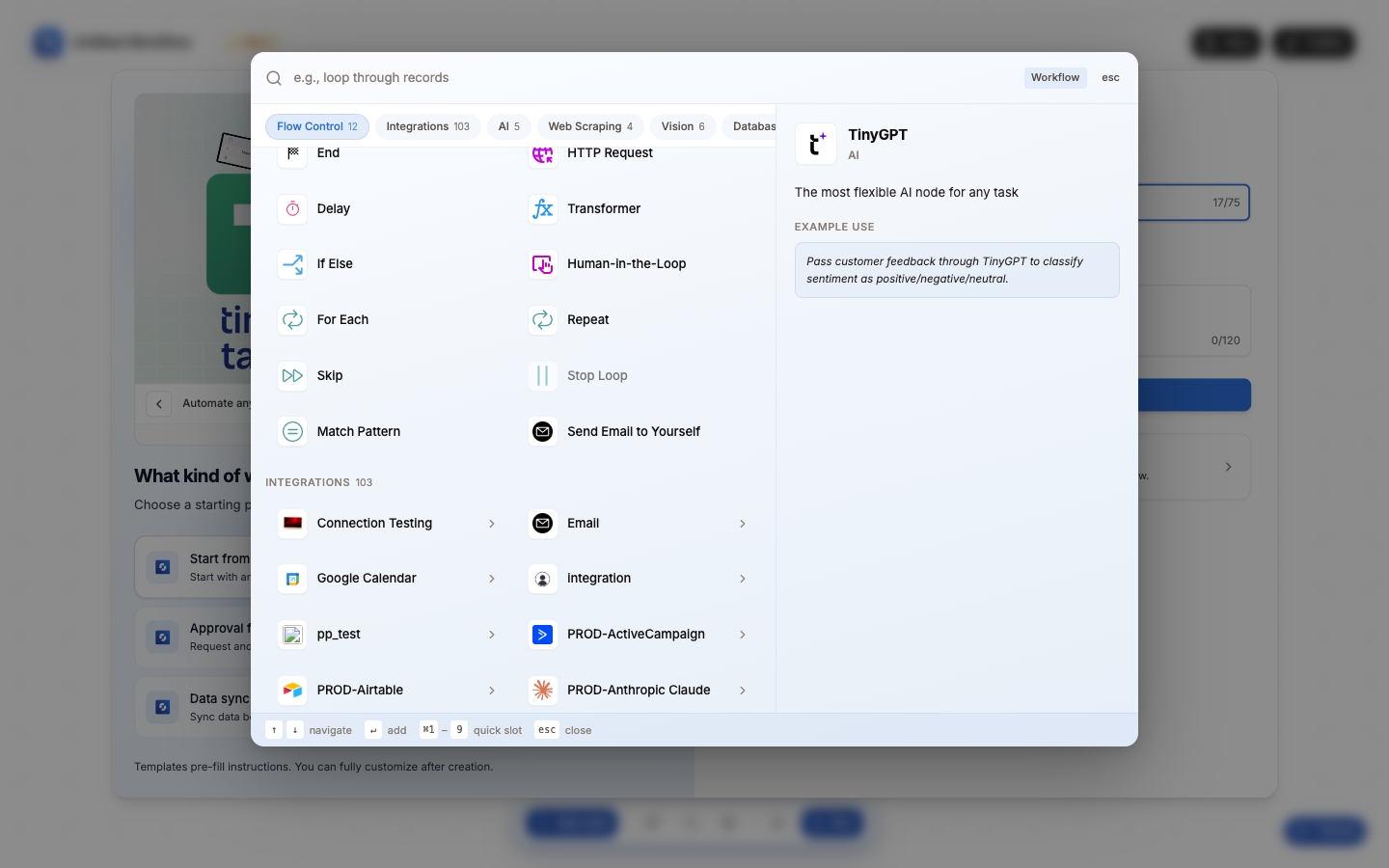
All 12 logic nodes
| Node | Type | Color | What it does |
|---|---|---|---|
| If-Else | IFELSE_V2 | Blue | Branch based on conditions; route to different actions for different cases |
| For Each | FOR_EACH | Orange | Loop over an array; run actions once per item in a list |
| Repeat | REPEAT | Indigo | Run a block of nodes a fixed number of times (2-1000) |
| Loop Until | LOOP_UNTIL | Violet | Keep looping until a condition is met (with safety cap) |
| Delay | Delay | Amber | Pause workflow execution for a set duration |
| Skip | SKIP | – | Skip to the next iteration in a loop (like continue) |
| Stop Loop | BREAK | Red | Exit the current loop early (like break) |
| Match Pattern | MATCH_PATTERN | Green | Extract text using regular expressions |
| End | END | – | Stop the workflow immediately |
| Human-in-the-Loop | HITL | Blue | Pause and wait for manual human approval |
| HTTP Request | HTTP | Magenta | Call any REST API (also in Flow Control category) |
| Transformer | TRANSFORMER_V3 | Blue | Build computed values from variables |
Loop nodes come in pairs
For Each, Repeat, and Loop Until all create a paired node automatically:
[Loop Start] → (your actions here) → [Loop End]
The Loop Start node defines the loop parameters. The Loop End node marks where the loop body ends. Everything between them runs for each iteration.
When to use which
| Scenario | Use this |
|---|---|
| "If X, do A; otherwise, do B" | If-Else |
| "For each item in this list, do X" | For Each |
| "Do this 5 times" | Repeat |
| "Keep trying until it succeeds" | Loop Until |
| "Wait 5 minutes, then continue" | Delay |
| "Skip this item, move to next" | Skip (inside a loop) |
| "Stop processing the rest of the list" | Stop Loop (inside a loop) |
| "Find all email addresses in this text" | Match Pattern |
| "Stop everything right now" | End |
| "Wait for human approval before proceeding" | Human-in-the-Loop |
| "Call an external API" | HTTP Request |
| "Combine variables into a formatted string" | Transformer |
Nesting
Logic nodes can be nested without limits:
- If-Else inside For Each: check a condition for each item in a list
- For Each inside For Each: nested loops (process rows within each sheet)
- If-Else inside If-Else: multi-level branching (or use Match Pattern for cleaner code)
- Delay inside For Each: rate-limit API calls by pausing between iterations
When you find yourself nesting 3+ If-Else nodes deep, consider using Match Pattern instead; it supports unlimited branches in a single node, which is cleaner and easier to maintain.
Nested loops multiply execution count. A For Each with 100 items containing another For Each with 50 items = 5,000 iterations. Each iteration consumes execution time and may hit API rate limits.