AI Nodes
TinyWorkflows has 5 built-in AI nodes powered by TinyGPT. Use them to classify data, generate text, research topics, search the web, and extract structured insights, all within the workflow canvas.
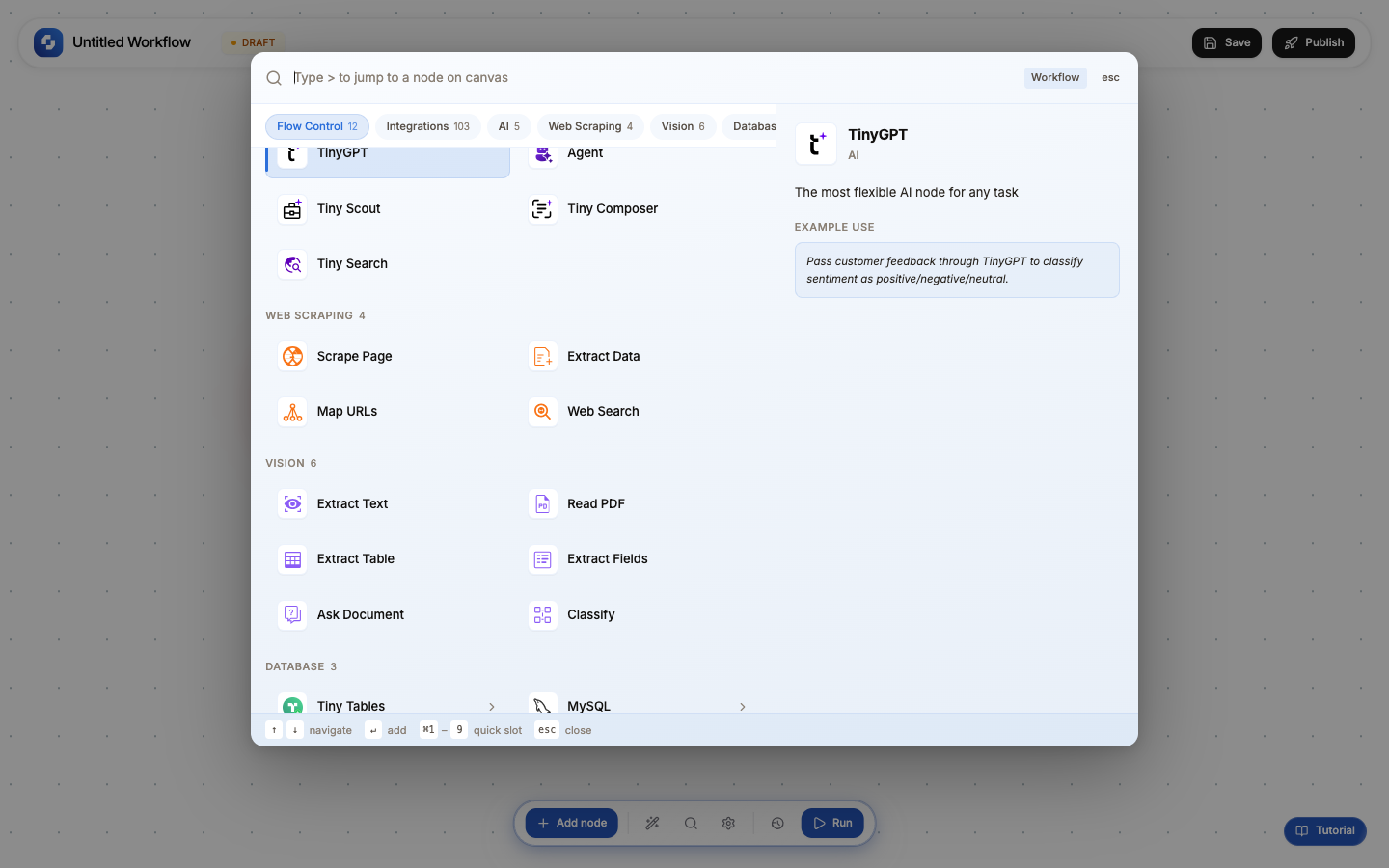
All 5 AI nodes
| Node | Type | Credits | What it does | Best for |
|---|---|---|---|---|
| TinyGPT | GPT | 1+ | Classify, extract, analyze, or generate structured data | Sentiment analysis, data extraction, ticket classification |
| GPT Writer | GPT_WRITER | 1+ | Generate text content with configurable tone and length | Email drafts, marketing copy, summaries |
| GPT Researcher | GPT_RESEARCHER | 1+ | Conduct structured research from multiple sources | Market research, competitor analysis, topic deep-dives |
| Tiny Search | TINY_SEARCH | 10 | Search the web and return structured results | Current events, lead discovery, content research |
| Agent | – | 10 | Run a TinyAgent sub-agent within a workflow | Complex multi-step AI tasks |
How AI nodes work
Every AI node follows the same 3-tab pattern: Initialise → Configure → Test
Initialise tab
Choose a template that pre-fills the prompt and configuration:
TinyGPT templates: Answer Questions, Generate Content, Extract Data, Classify & Categorize Writer templates: Professional email, Blog post, Social media post Researcher templates: Market Research, Competitor Analysis Search templates: Market Research, Competitor Analysis, Lead Generation, Content Research
Configure tab
Set the actual AI parameters:
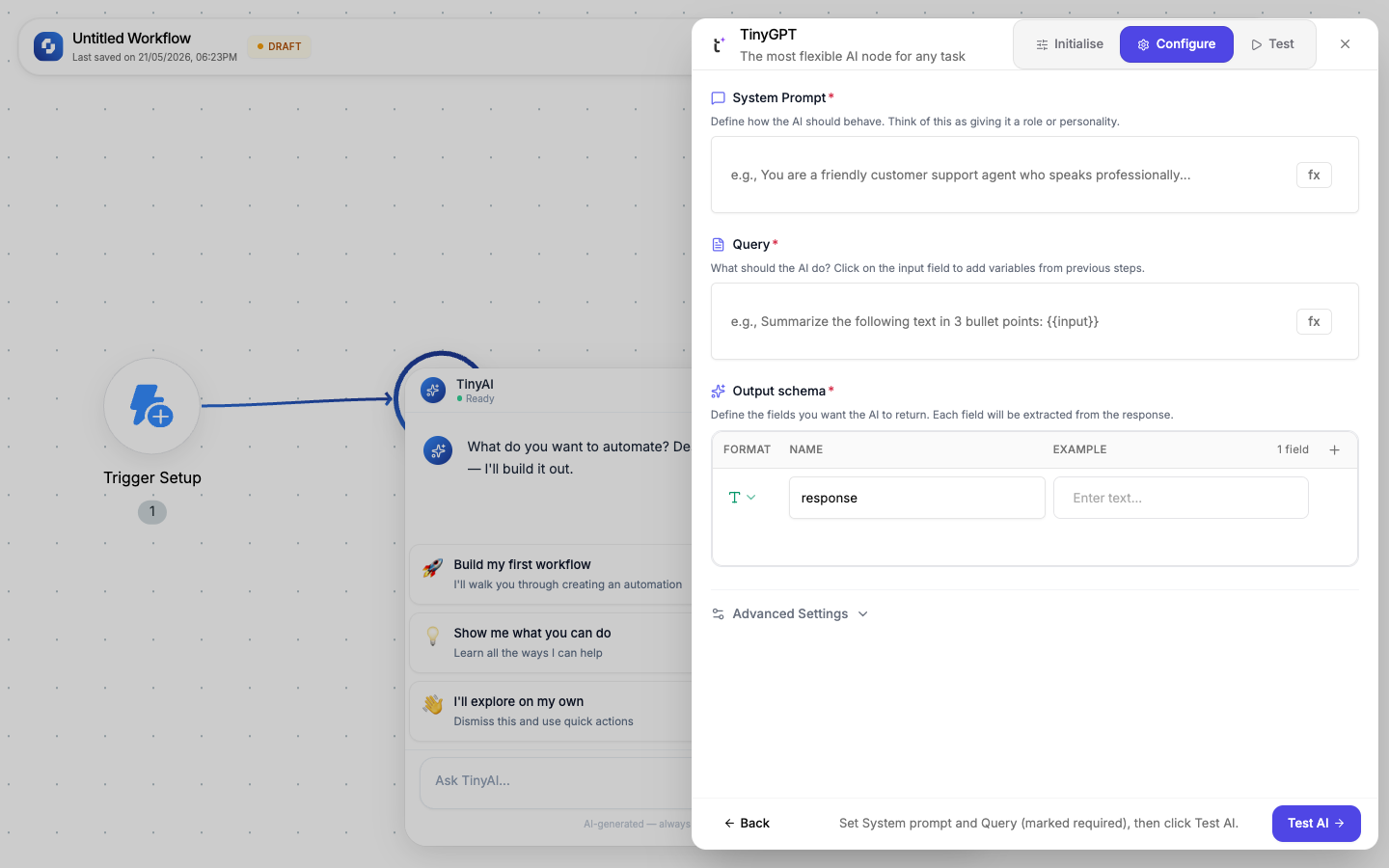
| Field | Required | Description |
|---|---|---|
| System Prompt | Yes | Define the AI's role and behavior: "You are a customer support classifier that..." |
| Query | Yes | The actual task: what to do with the input data. Supports FX variables. |
| Output Schema | Yes | Define the JSON structure the AI should return: field names, types, and examples |
| Temperature | No | Creativity level: 0.0 (deterministic) to 1.0 (creative). Default: 0.7 |
| Max tokens | No | Maximum response length. Default: 1024 |
Test tab
Run the AI with sample data and see the actual output. The test populates the output schema so downstream nodes can reference specific fields.
Output variables
After the AI processes, its output is available as variables:
{{tinygpt.result}}              → the full JSON result
{{tinygpt.result.category}}     → a specific field
{{tinygpt.result.confidence}}   → another field
{{tinygpt.result.key_phrases}}  → an array field
The exact field names match your Output Schema definition.
AI + Logic patterns
The real power comes from combining AI with logic nodes:
Classify and route
Webhook (support ticket) → TinyGPT (classify category + priority) → If-Else →
  billing: → Create JIRA ticket (billing queue)
  technical: → Send Slack message (#engineering)
  feature-request: → Add to spreadsheet (feature backlog)
Batch personalization
Schedule (daily) → Find All (pending outreach) → For Each →
  Person Enrichment → GPT Writer (personalized email) → Send Email
Research → Write → Review
Manual Trigger → GPT Researcher (topic research) → GPT Writer (draft article) →
  HITL (human review) → If approved → Publish
Enrich → Classify → Store
Form Submission → Company Enrichment → TinyGPT (classify lead tier) →
  Create Record (save to CRM with tier)
Prompt engineering tips
| Principle | Bad prompt | Good prompt |
|---|---|---|
| Be specific | "Analyze this text" | "Extract the customer's name, email, and main complaint. Return as JSON." |
| Define output | "Classify this" | "Classify as: billing, technical, feature-request, or other. Include confidence 0-1." |
| Give examples | "Summarize" | "Summarize in 2-3 bullet points, each under 20 words. Example: '• Payment failed for customer X'" |
| Set constraints | "Write an email" | "Write a 3-sentence follow-up email in professional tone. Do not mention pricing." |
AI output is probabilistic: the same input may produce slightly different results on different runs. For critical decisions (refunds, approvals, compliance), always add a Human-in-the-Loop node after the AI step.
All AI nodes use credits each time they run. Tiny Search and Agent steps cost 10 credits; TinyGPT, Writer and Researcher use at least 1 credit each time they run. Monitor usage in Monitor → Credit Usage.