HTTP Request
The HTTP Request node lets you call any REST API endpoint. Use it when there's no pre-built integration, or when you need full control over the API call.
Type: HTTP
Color: Magenta gradient (#7D007D → #C800C8)
Credits: 1 each time the step runs
Tabs: Initialise → Configure → Test
Tab 1: Initialise
When you add an HTTP Request node, the Initialise tab opens with template options.
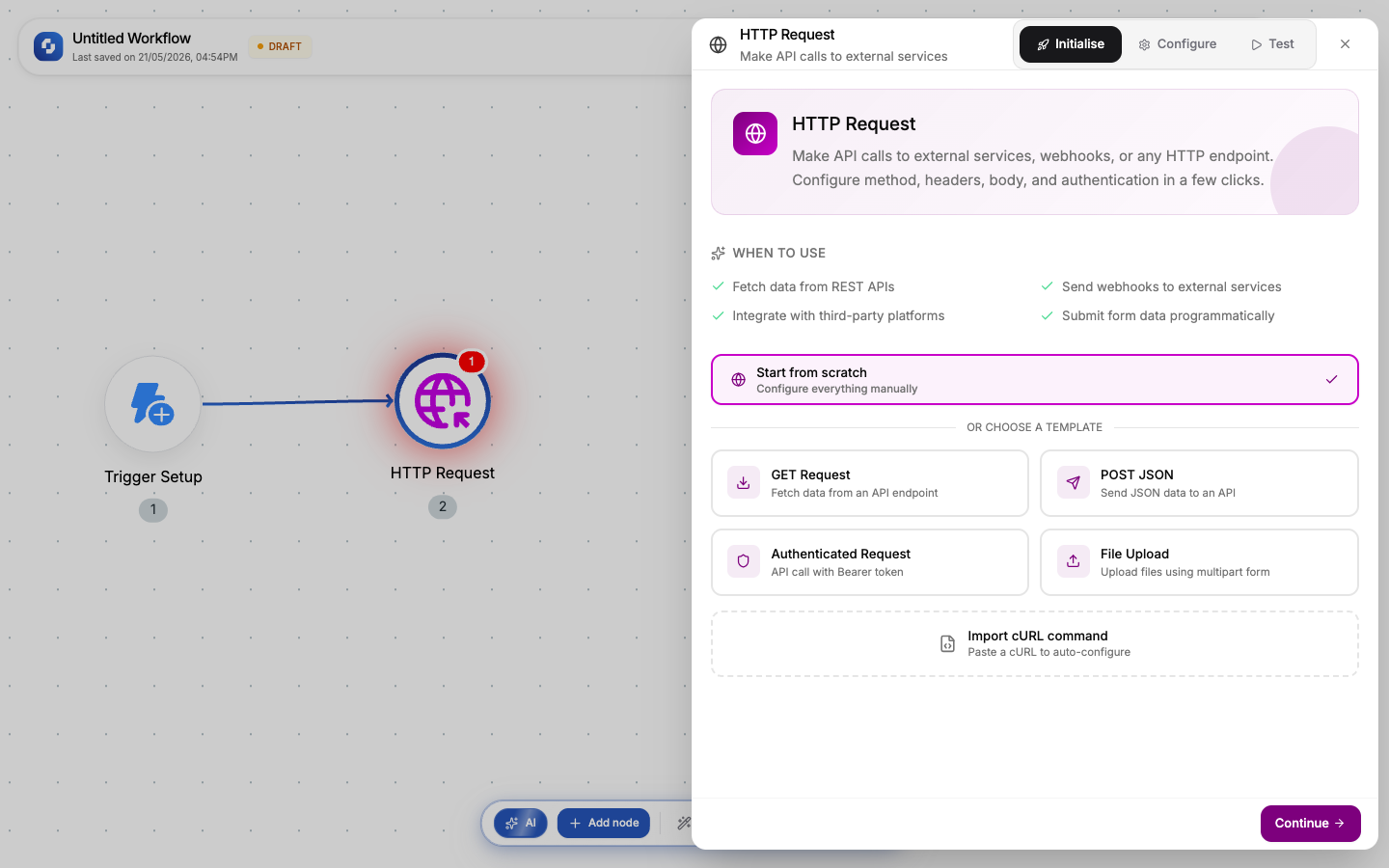
Templates
| Template | Pre-fills |
|---|---|
| Start from scratch | Empty; configure everything manually |
| GET Request | Method: GET, no body |
| POST JSON | Method: POST, Content-Type: application/json, raw JSON body editor |
| Authenticated Request | Method: GET, Bearer token auth header |
| File Upload | Method: POST, Form Data with file field |
| Import cURL | Paste any cURL command; it auto-populates method, URL, headers, body, auth |
Select a template and click Continue → to move to the Configure tab.
Import cURL is the fastest way to set up an API call. Copy the cURL from any API documentation, paste it in, and all fields are auto-filled.
Tab 2: Configure
The Configure tab is where you set up the actual API call. Fields vary based on the template you chose.
Method
Select the HTTP method:
| Method | When to use |
|---|---|
| GET | Fetch data (default) |
| POST | Create data, submit forms |
| PUT | Replace/update data |
| PATCH | Partially update data |
| DELETE | Remove data |
URL (required)
The API endpoint URL. Supports FX formulas; use variables from previous nodes:
https://api.example.com/users/{{trigger.body.user_id}}
Path variables use :variableName syntax; they appear in a separate field below the URL.
Query Parameters
Key-value pairs appended to the URL as ?key=value&key2=value2. Each value supports FX formulas. Add unlimited rows.
Headers
Custom HTTP headers as key-value pairs. Each value supports FX formulas. Common examples:
Content-Type: application/json
Authorization: Bearer {{token}}
X-API-Key: {{connection.api_key}}
Body (POST, PUT, PATCH only)
The request body. Five body types:
| Type | Description | Content-Type |
|---|---|---|
| None | No body | – |
| Raw → JSON | JSON editor with Grid (key-value table) or FX (raw formula) modes | application/json |
| Raw → Text | Plain text | text/plain |
| Raw → XML | XML string | application/xml |
| Raw → HTML | HTML string | text/html |
| Form Data | Key-value pairs with text or file fields | multipart/form-data |
| URL Encoded | Key-value pairs URL-encoded | application/x-www-form-urlencoded |
| Binary | Upload a file or use an FX formula for file data | application/octet-stream |
For JSON bodies, the Grid mode lets you build the JSON visually as key-value pairs. The FX mode gives you a raw formula editor for complex payloads.
Authorization
| Type | Fields |
|---|---|
| None | No authentication |
| Basic | Username + Password |
| Bearer | Token (FX formula; can reference variables) |
Tab 3: Test
The Test tab lets you run the API call with real data and see the response.
- Click Test to execute the request
- The response appears: status code, headers, and body
- If successful, the output schema populates automatically
- Downstream nodes can now reference response fields in the variable picker
Test runs make real API calls. If your endpoint creates data or triggers actions, be aware that the test will actually execute.
Output variables
After a successful test or execution:
| Variable | What it contains |
|---|---|
{{http_request.body}} | The parsed response body (JSON → object, text → string) |
{{http_request.body.fieldName}} | A specific field from the JSON response |
{{http_request.status}} | HTTP status code (200, 404, 500, etc.) |
{{http_request.headers}} | Response headers as key-value object |
Validation
| Rule | Severity |
|---|---|
| URL is required | Error: node won't save |
| Method defaults to GET if not set | Warning |
| POST/PUT/PATCH without a body | Warning (not error; some APIs don't need a body) |
Error handling
By default, 4xx and 5xx responses stop the workflow. To handle errors gracefully:
- Enable Continue on error in the node settings
- Add an If-Else node checking
{{http_request.status}} - Route
status === 200to success,status >= 400to error handling
Common patterns
Fetch + process
Trigger → HTTP Request (GET data) → Transformer (extract fields) → Create Record
POST with auth
Trigger → HTTP Request (POST to external API with Bearer token) → If-Else (check status) → Send notification
Webhook forwarding
Webhook Trigger → HTTP Request (forward payload to another service)
Chain multiple HTTP Request nodes to call different APIs in sequence. Each node's response is available to the next via variables.