Identity & Instructions
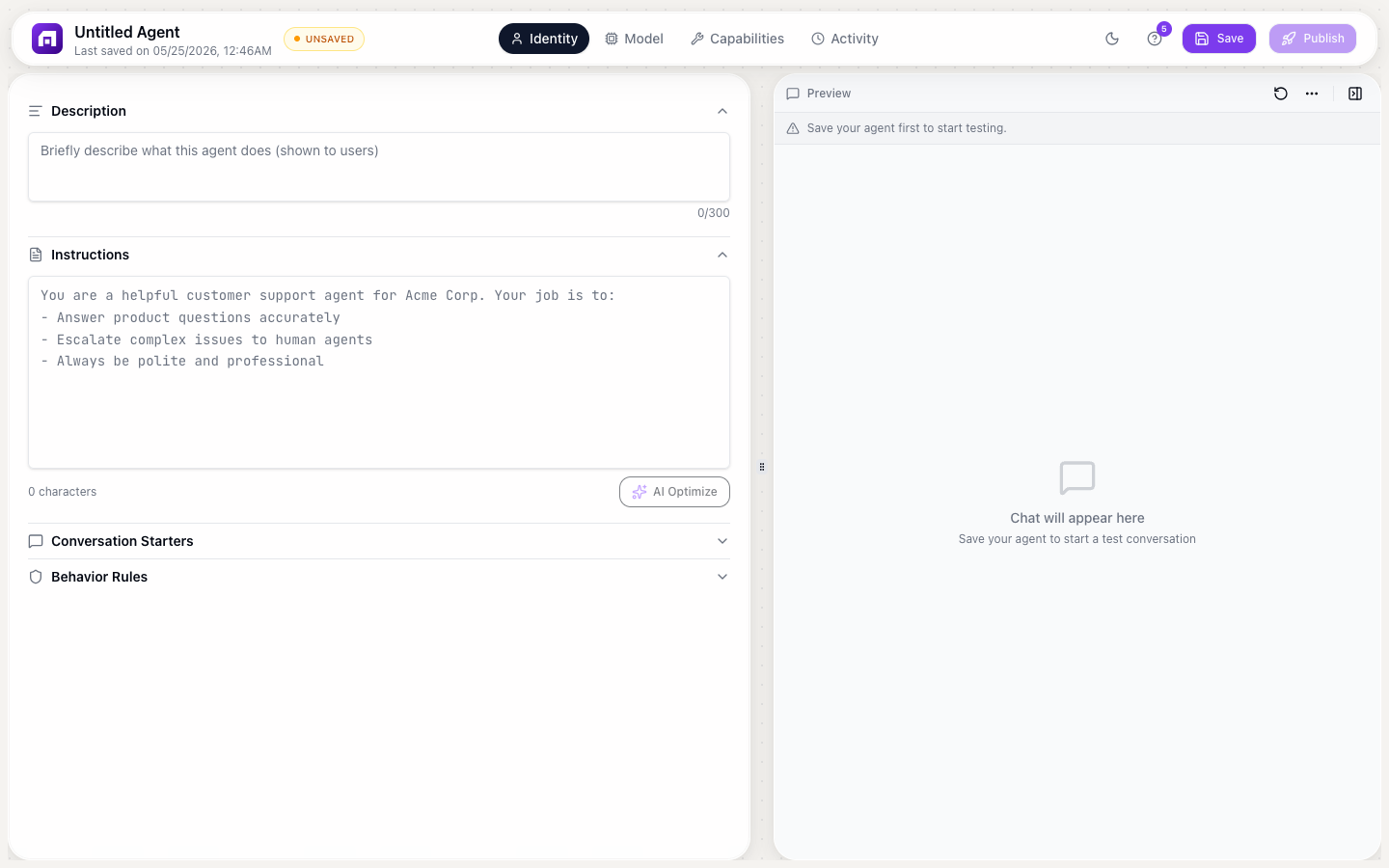
The Identity tab is where you define WHO your agent is and HOW it behaves. This is the most important configuration, because it determines the quality of every conversation.
Instructions (System Prompt)
The Instructions field is the system prompt sent with every message. It tells the AI:
- What role to play
- What tone to use
- What knowledge to reference
- What rules to follow
- What to do when uncertain
Writing effective instructions
Bad instruction:
You are a helpful assistant.
Good instruction:
You are a customer support agent for TinyCommand, a no-code automation platform.

Your responsibilities:
- Answer questions about TinyCommand products: Workflows, Forms, Tables, Emails, Agents
- Guide users through common tasks: creating workflows, setting up integrations, troubleshooting errors
- Reference the documentation when explaining features

Your tone:
- Friendly but professional
- Concise — answer in 2-3 sentences when possible
- Use bullet points for multi-step instructions

When you don't know:
- Say "I'm not sure about that" instead of guessing
- Suggest contacting support@tinycommand.com for billing or account questions
- Never make up features that don't exist
AI Optimize button
Click AI Optimize to let AI improve your instructions automatically. It:
- Adds structure (role, responsibilities, tone, constraints)
- Fills gaps in coverage
- Makes instructions more specific
- Preserves your intent while improving clarity
Description
A short (300 character max) summary of what the agent does. Shown in the agent list and used internally. Not visible to end users in the chat.
Customer support agent for TinyCommand. Answers product questions, guides through
setup, and troubleshoots workflow issues. Escalates billing questions to human support.
Conversation Starters
Suggested prompts shown to users when they first open the chat. These guide users toward productive interactions:
| Good starters | Why they work |
|---|---|
| "How do I create my first workflow?" | Clear action, common question |
| "What integrations are available?" | Specific topic |
| "Help me set up email automation" | Describes a goal, not just a topic |
| "Why is my workflow failing?" | Troubleshooting entry point |
Tips
- Use 3-5 starters (not too many)
- Frame as things users actually ask
- Cover different use cases
- Make them actionable, not generic
Avoid: "Tell me about your features" (too vague), "Hello" (wastes a turn)
Behavior Rules
Hard guardrails the agent ALWAYS follows: non-negotiable rules that override everything else. Unlike instructions (which are "try to"), behavior rules are "you MUST":
- NEVER share pricing information — redirect to tinycommand.com/pricing
- NEVER generate or store passwords, API keys, or credentials
- ALWAYS recommend contacting support for billing changes
- NEVER claim features that don't exist — check documentation first
- IF a user seems frustrated, offer to connect them with a human agent
Instructions vs Behavior Rules
| Instructions | Behavior Rules |
|---|---|
| Guidelines | Hard rules |
| "Try to be concise" | "NEVER exceed 500 words" |
| Can be bent by user requests | Cannot be overridden |
| Shapes general behavior | Prevents specific harmful actions |
Without behavior rules, users can "jailbreak" your agent by asking it to ignore its instructions. Behavior rules are harder to override because they're enforced as constraints, not suggestions.
Start with 3-5 behavior rules covering your most critical concerns (data safety, accuracy, escalation). Add more as you discover edge cases from real conversations in the Activity tab.