TinyAgents
TinyAgents lets you build AI-powered agents that can take real actions: research prospects, write personalized emails, enrich data, answer customer questions, and interact with your tools. Deploy them as chat widgets, API endpoints, or connect them to workflows.
What you can build
- Customer support agent: answer questions using your knowledge base
- Content writer agent: generate articles, emails, social posts
- Data analyst agent: analyze spreadsheet data and generate insights
- Sales development agent: research prospects, compose outreach
- Code assistant agent: help developers with code-related queries
Creating an agent
- Go to Build → Agents → + Create Agent
- Choose a starting template:
| Template | What it sets up |
|---|---|
| Start from scratch | Empty agent: configure everything |
| Customer Support | Pre-configured for support queries with knowledge base |
| Data Analyst | Configured for data analysis tasks |
| Content Writer | Writing-focused with tone and style settings |
| Code Assistant | Developer-oriented with code generation |
- Name your agent and optionally describe what it does
- You'll land in the Agent Studio with 4 configuration tabs
Configuration: 4 tabs
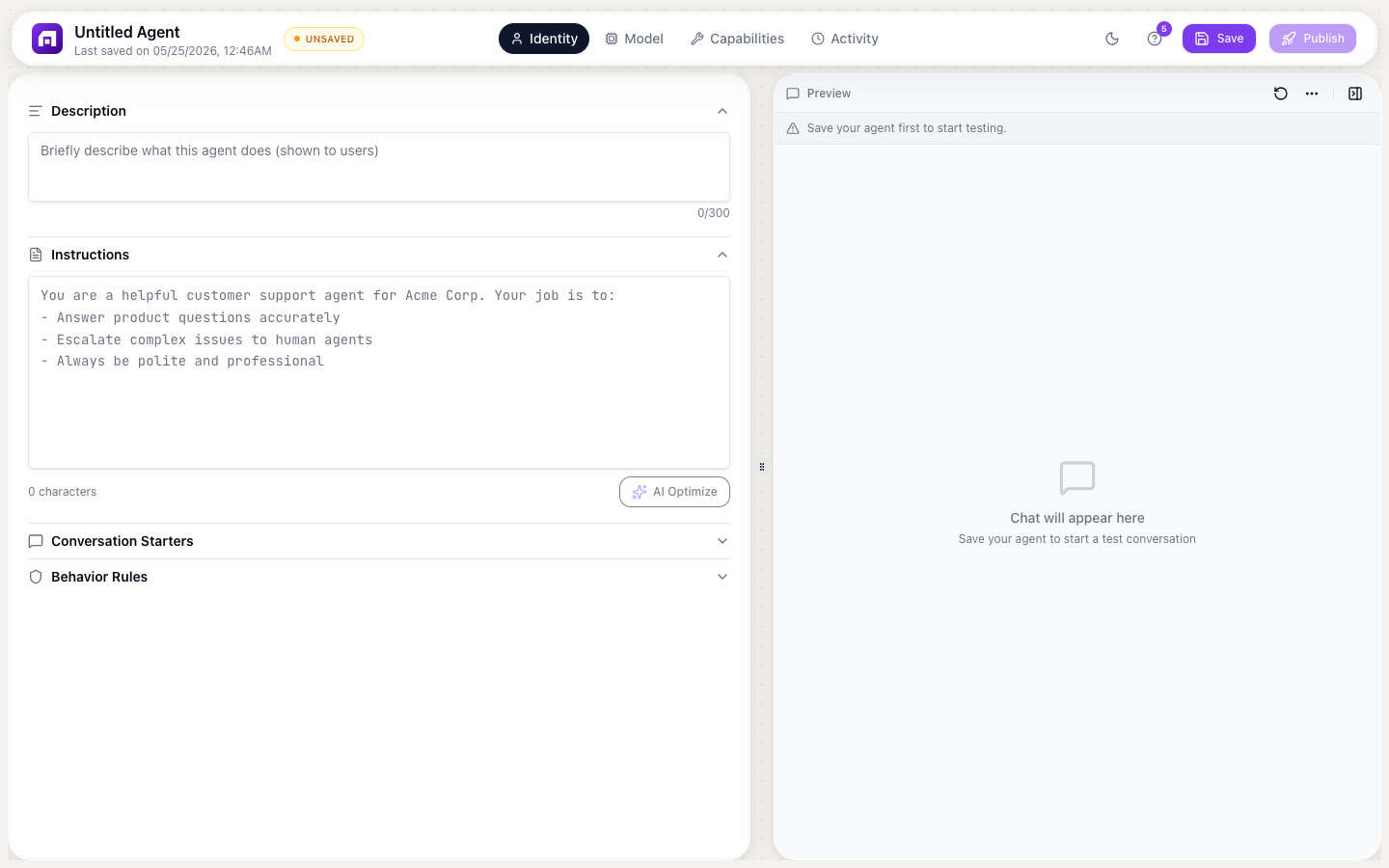
Identity tab
| Field | Description |
|---|---|
| Description | What the agent does (300 characters max) |
| Instructions | System prompt: tells the AI how to behave (freeform text). Has an "AI Optimize" button to improve your instructions automatically |
| Conversation Starters | Suggested prompts shown to users (orderable list) |
| Behavior Rules | Hard guardrails the agent always follows: non-negotiable rules |
Capabilities tab
| Feature | Description |
|---|---|
| System tools | Built-in tools; toggle on/off individually |
| Custom tools | Build tools from external APIs or TinyWorkflow automations |
| Prebuilt agents | Attach sub-agents for specialized tasks |
| Knowledge Base | Upload PDF, DOCX, TXT, CSV files (up to 10MB each) for the agent to reference |
Prebuilt sub-agents
| Sub-agent | Category | What it does |
|---|---|---|
| Tiny Scout | Research | Research prospects and companies |
| Tiny Composer | Communication | Write personalized messages and emails |
| Tiny Search | Research | Search the web for information |
| Company Enricher | Enrichment | Look up company details from a domain |
| Person Enricher | Enrichment | Find contact details from name + company |
| Email Finder | Enrichment | Find email addresses |
Brain tab
Configure the AI model powering the agent:
| Field | Description |
|---|---|
| Provider | OpenAI, Anthropic, Google Gemini, Mistral, or TinyGPT |
| Model | Specific model (e.g., GPT-4o, Claude 3.5 Sonnet, Gemini Pro) |
| Temperature | Creativity level (0 = deterministic, 1 = creative) |
| Max tokens | Maximum response length |
| API key | Bring your own key or use saved keys |
Azure OpenAI is also supported with custom endpoint and deployment configuration.
Activity tab
Live conversation log: see all interactions with the agent in real time.
Deployment
Deploy your agent in 3 steps:
Step 1: Appearance
| Setting | Options |
|---|---|
| Avatar | Custom image URL |
| Chat color | Presets + custom color picker |
| Font | System UI, Oswald, Poppins, Georgia, Monospace |
| Audio input | Toggle voice input on/off |
| File attachments | Toggle file upload on/off |
| Powered By badge | Toggle TinyCommand branding (plan-gated) |
Step 2: Publish
Click Publish to generate a public URL. Republish when you make changes.
Step 3: Embed
6 embed modes. Copy the script tag and paste it into any website:
| Mode | Description |
|---|---|
| Inline | Rendered directly in the page content |
| Full Page | Takes over the entire page |
| Popup | Button that opens a modal chat window |
| Corner Button | Floating button in the corner (most common for support bots) |
| Floating | Floating chat bubble |
| Sidebar | Collapsible sidebar panel |
Each mode generates a <script> tag to paste into your HTML.
Connecting to workflows
Agents can use TinyWorkflow automations as custom tools:
- Create a workflow that accepts input and produces output
- In the agent's Capabilities tab, add a Custom Tool
- Connect it to the workflow
- The agent can now call the workflow as part of its reasoning
This lets agents take real actions (create CRM records, send emails, update databases), not just generate text.
Conversations with an agent that runs on TinyGPT use credits from your workspace balance. If the agent uses your own API key for another provider, that provider bills your account for the model usage. Monitor usage in Monitor → Credit Usage.
Start with a template (Customer Support or Content Writer) and customize from there. It's faster than building from scratch, and the templates include tested instructions and behavior rules.