Payment Forms: The Form Is the Checkout (2026 Guide)
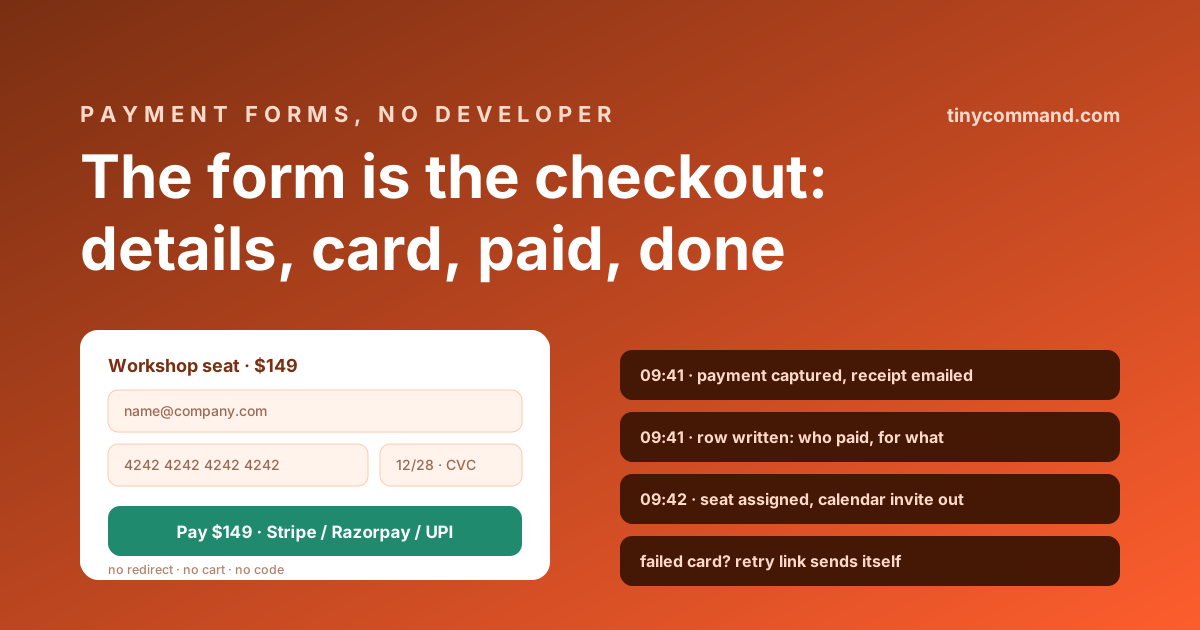
TL;DR: For anything that is not a multi-product store (workshop seats, service deposits, bookings, donations, single products), a full checkout build is overkill and a payment link in a follow-up email is a leak. The payment form is the middle path: details and card on one screen, charged on submit, receipt and fulfillment automated. Stripe for cards, Razorpay and UPI for Indian businesses, and the whole thing shareable as a link. No cart, no code, no invoice chase.
When a form beats a checkout
Checkout systems earn their complexity at catalog scale: inventory, shipping matrices, tax engines. A consultant collecting a deposit, a workshop selling 40 seats, a club collecting dues: these have one or two SKUs and a buyer who already decided. What kills conversion at this scale is distance between decision and payment, which is exactly what "submit the form, then wait for an invoice" creates. The form-as-checkout closes that distance to zero, the same logic as the order form's payment rule, minus the product grid.
The anatomy of a payment form that converts
- The thing and its price, stated. "Workshop seat · $149" above the fields. Surprise at the pay button is abandonment.
- Only the fields fulfillment needs. Name, email, and whatever delivery requires. Every extra field costs buyers; the five-question test applies double when money is on the screen.
- The payment field, native. Card via Stripe, or Razorpay and UPI where your buyers are; in TinyForms these are form fields on the free plan, not a paid add-on or a redirect.
- Conditional pricing where it earns its keep. Early-bird windows, member discounts, quantity choices: calculated fields adjust the charge live, so the button always shows the real number.
- One trust line. Processor name and refund policy in small text near the button. Two sentences, measurable difference.
The minute after payment
The charge is the start of the automation, not the end of the form. In one workflow: receipt email with the specifics merged in, a row written recording who paid for what, fulfillment triggered (calendar invite, access link, packing ping), and for events, the seat math from the registration guide. The buyer's anxiety window between paying and hearing back should be measured in seconds.
The safety net: failed payments
Cards decline for boring reasons, and at form-scale every decline is a known person mid-purchase, which makes recovery unusually easy: an automatic retry link within minutes ("your seat is held for 24 hours") and one follow-up the next day. Two emails, written once, recovering revenue forever; ignoring declines is the most expensive default in this category.
Compliance, briefly
Use native processor fields and the card data never touches your form's storage; Stripe and Razorpay handle PCI scope. Collect the billing details your tax jurisdiction requires (GST fields for Indian B2B, for instance) in the form itself so invoicing automation has what it needs. Templates with payment wiring included are in the gallery.
Payment form FAQ
Can a form collect payments without a website checkout?
Yes. Form builders with native payment fields charge the card inside the form via Stripe, Razorpay, or UPI, and the form link itself becomes the checkout. For single products, seats, deposits, and dues, it replaces a cart entirely.
Are payment forms secure and PCI compliant?
When the payment field is the processor's own embed, card data goes directly to Stripe or Razorpay and never touches your form storage, keeping you outside meaningful PCI scope. Avoid any builder that stores raw card numbers as text.
What should happen after a payment form is submitted?
Within a minute: receipt emailed with details merged, the payment recorded in a table, and fulfillment triggered (access link, calendar invite, or shipping ping). A failed charge should generate a retry link automatically.
What is the best free way to make a payment form?
TinyForms includes Stripe, Razorpay, and UPI payment fields on its free plan with unlimited forms and responses, plus workflow automation for receipts in the same canvas.