Order Forms That Add, Charge, and Confirm Themselves (2026 Guide)
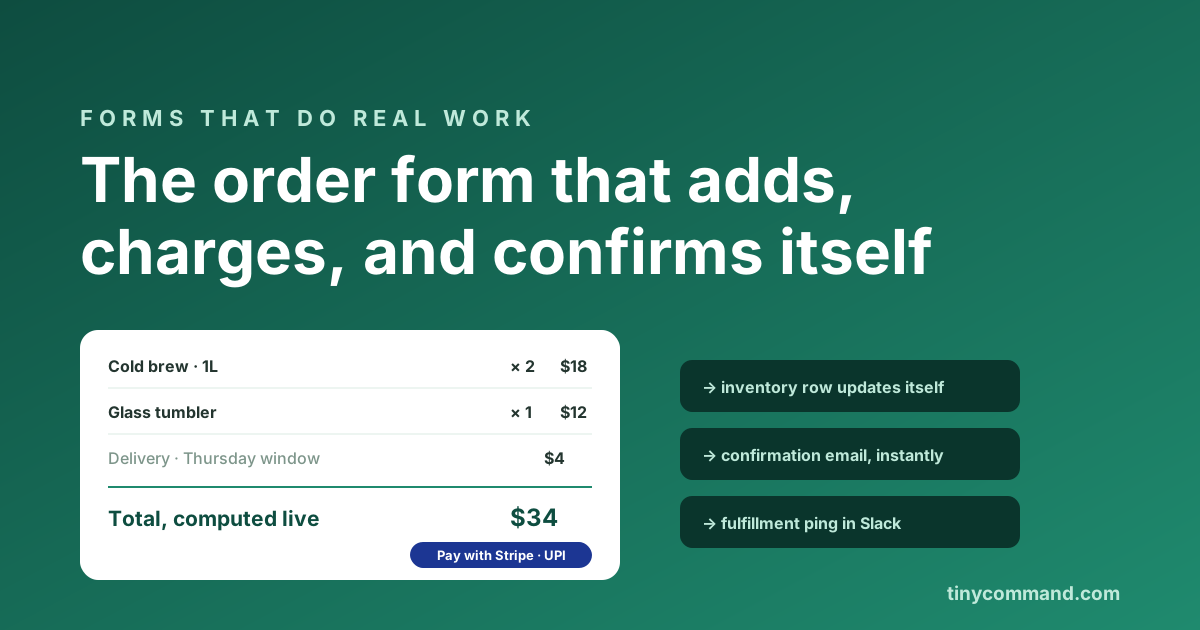
TL;DR: A working order form does four jobs in one motion: capture the items, compute the total live, take the payment inside the form, and confirm automatically. Most order form problems trace back to splitting those jobs across tools (a form here, an invoice there, a payment link in an email). Below: the field list that works, the calculation and payment setup, the three mistakes that cost real money, and the automation that should fire the moment someone pays.
The fields an order form actually needs
- Product selection with quantities. Picture choice or dropdown per item, with a quantity stepper. Photos lift order values; nobody buys the thing they cannot see.
- A live total. A calculated field that updates as items change. Showing the math builds trust and kills the "wait, how much?" abandonment at the end.
- Delivery or pickup details. Address only if you ship; a pickup-window dropdown if you do not. Ask only what fulfillment needs.
- Payment, inside the form. Stripe, or for Indian businesses Razorpay and UPI, as a form field rather than a link sent later. Every minute between "I want this" and "I paid" leaks orders.
- One optional notes box. Allergies, engraving, gate codes. One box covers every special case without ten extra fields.
The calculation layer
Quantity times price, plus delivery, minus a discount code: that is multiplication and addition, and your form should do it, not your customer. In TinyForms calculated fields handle running totals and conditional charges (free delivery above $50, say) without code. If a form builder makes you bolt on a paid widget for arithmetic, that is your answer about the rest of it; our five-question builder test applies in full here.
The three expensive mistakes
Payment by follow-up invoice. The order form collects intent, then someone emails an invoice hours later. Conversion drops with every hour, and a third of those invoices chase people who already cooled.
No inventory connection. The form happily sells the last unit twice. Orders should land in a live table where stock counts down, and the form should hide what is gone.
Manual confirmation. If a human sends the "got your order" email, the human is the bottleneck at exactly the moment the customer is most anxious. Confirmation belongs to a workflow, with the order details merged in, within seconds of payment.
What should happen after the buy button
The 60 seconds after payment decide whether your operation scales: order row written with items and amounts, stock adjusted, confirmation email with the details, a fulfillment ping to whoever packs, and a scheduled workflow that later asks for a review or a reorder. On a bundled stack, that is one canvas; on a metered stack, that is five glued tools billing per task. The templates gallery has order forms with the calculation and payment wiring already in place, free to customize.
Order form FAQ
What fields should an order form include?
Product choices with quantities, a live calculated total, delivery or pickup details, payment inside the form, and one optional notes box. Everything else is friction; every removed field raises completion.
Can an order form take payments without a website checkout?
Yes. Form builders with native payment fields (Stripe, Razorpay, UPI) charge inside the form itself, no cart or checkout build required. TinyForms includes payment fields on the free plan, which makes a shared link a complete storefront for simple catalogs.
How do I calculate totals automatically in an order form?
Use calculated fields: quantity times unit price, summed across items, with conditional logic for delivery fees or discounts. The total updates live as the buyer changes the order, before payment is requested.
How do I stop overselling with an order form?
Connect the form to live inventory. Orders write to a stock table and decrement counts. The form does not hide sold-out options on its own, so a workflow alert at low stock tells you when to take one down.