Monday.com Pricing Explained (2026): Why Six People Buy Ten Seats
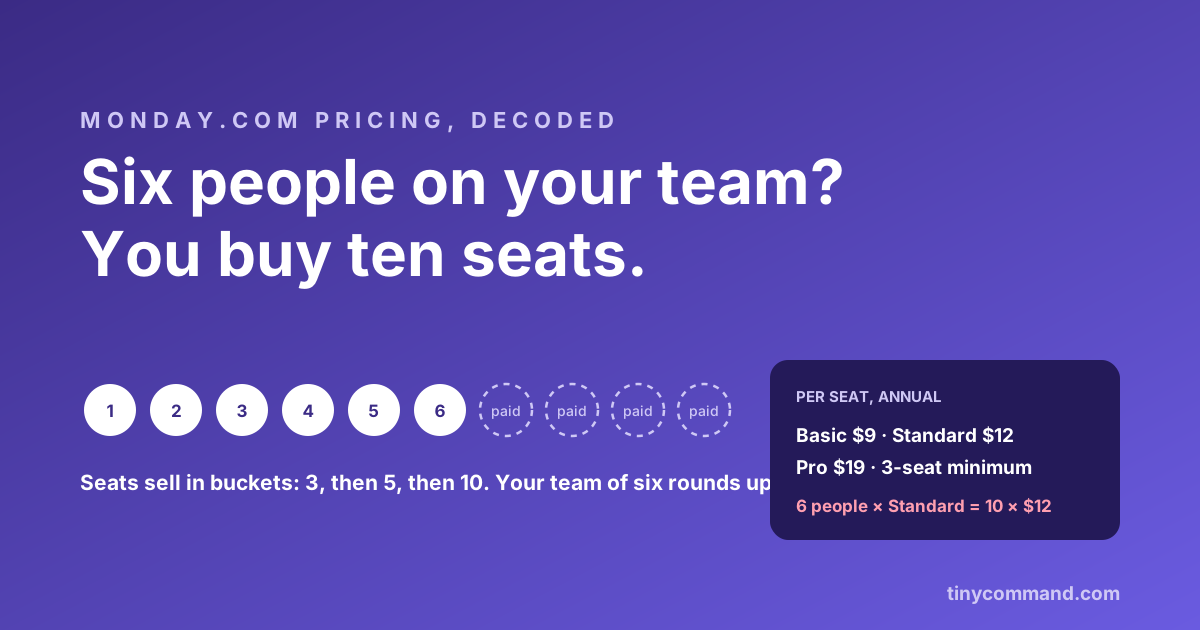
TL;DR: Monday.com's per-seat prices look friendly: Basic $9, Standard $12, Pro $19 on annual billing. The detail that actually sets your bill is the bucket: paid plans start at 3 seats and then jump 5, 10, 15. A team of four buys five seats; a team of six buys ten. On Standard, those six people pay for ten seats at $12, which is $120 a month for $72 of team. Budget the bucket, not the sticker.
The tiers and the buckets
| Plan | Per seat (annual) | Per seat (monthly) | Highlights |
|---|---|---|---|
| Free | $0 | $0 | 2 seats, 3 boards |
| Basic | $9 | $12 | Unlimited boards, 5 GB |
| Standard | $12 | $14 | Timeline, calendar, automations (250 actions/mo) |
| Pro | $19 | $24 | Private boards, time tracking, 25,000 automation actions |
Seats sell in steps of 3, 5, 10, 15 and up. The rounding is invisible on the pricing page and very visible on the invoice. Add the second meter: automation and integration actions are capped per month by tier (250 on Standard), and busy boards chew through caps faster than teams expect.
The worked example
- Team of six on Standard, annual billing: forced to the 10-seat bucket. 10 × $12 = $120 a month, $1,440 a year.
- Effective per-person price: $20 a month, not the $12 on the sticker.
- Hire numbers seven through ten: free, you already paid. Hire number eleven: hello, 15-seat bucket.
Where Monday earns it
Monday is a genuinely pleasant project tracker. The boards are fast and colorful, status culture sticks because the UI rewards it, and for teams that live in timelines and workload views, the Standard tier is fairly priced even with rounding. If project visibility is the whole job, Monday does that job well; our comparison page is happy to say so.
Where the bill outgrows the job
The strain arrives when boards stop being projects and start being operations: client pipelines, intake queues, request trackers. Now every stakeholder needs a seat, the bucket jumps, and the automation cap meters the very workflows that made the board useful. Ops data wants a real database with a generous automation allowance, which is the shape of Tiny Command's $49 flat plan: tables, workflows, forms, and email, with 50,000 credits a month (one per workflow step) and no seat buckets to round into.
Or keep Monday for projects and automate around it
The augment route: TinyWorkflows connects to Monday with 2 triggers and 10 actions, creating and updating items and reacting to board changes. The pattern that works: intake through TinyForms (clients never need seats), enrichment and routing in the workflow, and only the items your PM team actually manages land on the board. Stakeholders get status by automated email instead of read-only seats. Monday stays the project home; the seat count stays in the small bucket. The rest of the per-seat family is covered in this series (Notion, Airtable), and the flat-rate ledger is on the pricing page.
Monday.com pricing FAQ
How much does Monday.com cost in 2026?
Basic $9, Standard $12, Pro $19 per seat per month on annual billing ($12, $14, $24 monthly). Paid plans start at 3 seats and sell in buckets, so teams round up to 5, 10, or 15 seats.
Why am I paying for more Monday seats than I have people?
Seat buckets. Monday does not sell exact seat counts on standard plans; a team of six is placed in the 10-seat bucket and pays for ten. The effective per-person price is the bucket total divided by your actual headcount.
What are Monday.com automation limits?
Each tier caps automation and integration actions per month (250 on Standard, 25,000 on Pro). Active boards with notifications and syncs can exhaust lower caps quickly, pushing teams up a tier independent of seats.
How do I keep a small Monday plan as my team grows?
Keep non-PM stakeholders off the board: intake via forms, status via automated email, and only managers as seats. TinyWorkflows (2 Monday triggers, 10 actions) runs that pattern inside a $49 flat plan. Seat and bucket facts: monday.com support docs, June 2026.