AI Automation, Without the Fog: What It Is and How to Start (2026)
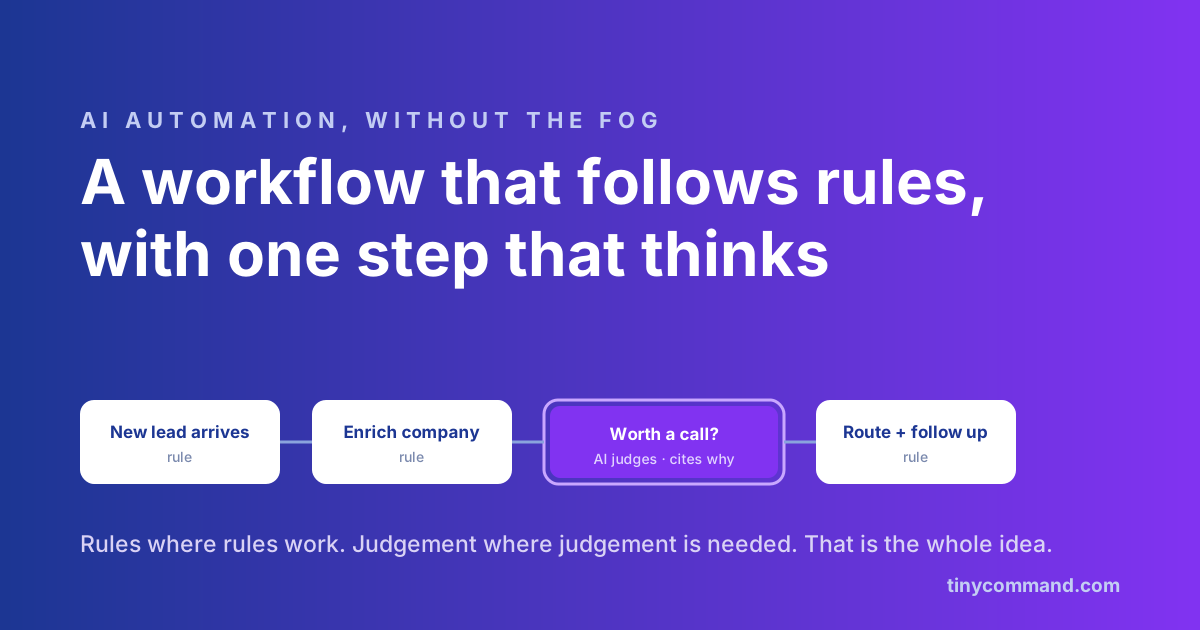
TL;DR: AI automation is regular automation with judgement inserted where rules run out. The workflow still follows deterministic steps (trigger, enrich, route, send); an AI step handles the parts that used to need a human: reading a document, scoring a lead, drafting a reply, deciding which bucket something belongs in. Four patterns cover almost every real deployment, and you can ship the first one in an afternoon without code. Gartner expects 40% of enterprise applications to embed task-specific AI agents by the end of 2026, so the fog is worth clearing now.
The definition that actually helps
Plain automation executes rules: when a form is submitted, add a row, send a Slack message. It is fast, cheap, and literal. The literalness is the limit. Rules cannot read a rambling support email, judge whether a lead is worth a salesperson's morning, or summarize a contract.
AI automation keeps the deterministic skeleton and adds thinking steps at the exact joints where judgement was the bottleneck. The skeleton stays auditable. The AI step gets a narrow job with a clear input and output. That division of labor, rules where rules work and judgement where it is needed, is the entire idea, and the deployments that fail are almost always the ones that ignored it and asked AI to be the whole skeleton.
The four patterns that cover almost everything
1. The AI step inside a workflow. A normal flow with one smart node: classify this ticket, score this lead 0 to 100, extract the invoice total. The workflow branches on the answer. This is the gateway pattern and the right first project.
2. The document reader. PDFs, scans, and images become structured data: pull the table, grab the fields, classify the document type. Pure drudgery deletion, and accuracy is measurable.
3. The enrichment brain. An email address arrives; AI plus data sources turn it into company, size, industry, and fit. Sales teams feel this one within a week.
4. The agent as worker. The full version: software you give a goal, which then picks tools, reads results, and decides next steps, answering customers on your site or qualifying leads around the clock. This pattern earns a guide of its own, and ours is the no-code AI agent guide.
Three starter projects, ranked by payoff per effort
- Lead triage (start here). Form submission triggers enrichment, an AI score with a one-line reason, and routing: hot to Slack, warm to a table for your next campaign. On TinyWorkflows this is one canvas with an AI node in the middle; each step draws credits from the one pool that also covers your tables, email and agents, with no separate middleware task meter on top.
- Inbox-to-ticket triage. AI reads each inbound email, tags urgency and topic, drafts a reply for a human to approve. The approval gate is what makes it shippable on day one.
- Document intake. Invoices or applications arrive as PDFs; AI extracts fields into a table and flags the ones that need eyes. Boring, measurable, beloved by ops.
What to require before you trust it
Three things separate AI automation you can run from a demo you regret. Visible reasoning: every AI step should show what it read and why it decided. An approval gate in front of anything irreversible, especially anything customer-facing. A narrow job description: agents scoped to one task ship; agents asked to run a department join the 88% of pilots that never reach production. The deeper background on agents, including that statistic, is in our AI agents explainer.
Starting without code, concretely
The no-code path on Tiny Command looks like this: build the deterministic flow first and run it dumb for a day. Add one AI node where the human bottleneck was. Give it the narrowest possible instruction, test on ten real examples, then turn on the approval gate and let it run. The whole stack (forms, tables, workflows, agents, email) is included in a $49 flat plan, so the experiment does not need a procurement cycle. The pricing page has the math.
AI automation FAQ
What is the difference between automation and AI automation?
Automation executes predefined rules. AI automation inserts judgement steps (classify, score, extract, draft) into those rules, handling inputs too messy for deterministic logic while keeping the auditable skeleton.
What is the best first AI automation project?
Lead triage: enrich each new lead, score it with an AI step that states its reason, route hot ones to a human instantly. It is contained, measurable, and pays back in days.
Do I need developers to build AI automation?
Not anymore. No-code platforms let you drop AI steps into visual workflows and build full agents through configuration. A first working version typically takes an afternoon; production hardening takes a few more sessions.
How much does AI automation cost?
Per-task middleware plus per-token AI fees stack two meters. Bundled platforms put AI steps on the same bill; Tiny Command includes AI nodes and agents in its $49 plan, where each step draws credits from one monthly pool. The honest answer is: cost depends on the meter shape, so read it before volume arrives.